
Interrupt display screen (when the ignition switch is “ON”)
Warning display
When there is information to be announced, such as a system fault, a sound is emitted and the information screen switches to the warning display screen.
Refer to the warning list and take the necessary measures.
Refer to “Warning display list (when the ignition switch is “ON”)”.
When the cause of the warning display is eliminated, the warning display goes out automatically.
To return to the screen displayed before the warning display
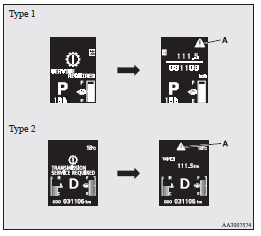
Even if the cause of the warning display is not eliminated, you can return to the screen that was displayed before the warning display.
If you press the multi-information meter switch, the display screen switches
to the screen that was displayed before the warning display and the
 mark (A) is displayed.
 Note
Note
► Warning display screens with a  or
or  mark displayed in the upper right
of the screen can be switched. If you want to switch the display, press the multi-information
meter switch as follows.
mark displayed in the upper right
of the screen can be switched. If you want to switch the display, press the multi-information
meter switch as follows.
 : Press lightly.
 : Press for about 2 seconds or more.
Redisplay of a warning display screen
When the mark is displayed, if you
lightly press the multi-information meter switch a few times, the warning display
screen you switched from is displayed again.
Other interrupt displays
The operation status of each system is displayed on the information screen.
Refer to the appropriate page in the warning display list for further details.
Refer to “Other interrupt displays (when the ignition switch is “ON”)”.
See also:
Vehicles with Sports mode
The transmission has 4 forward gears and 1 reverse gear.
The individual gears are selected automatically, depending on the position of
the gear selector lever, the speed of the vehicle and the po ...
Pretensioner system
The pretensioner system will retract their respective seat belts instantaneously,
thus maximizing the seat belt’s effectiveness, if there is a frontal impact severe
enough to injure the driver a ...
Front fog lamp indication lamp
This lamp illuminates while the front fog lamps are on. ...