
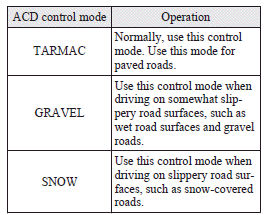
ACD control mode
Select the control mode from the following three types to suit the driving conditions.
See also:
Parking brake
To park the vehicle, first bring it to a complete stop, fully apply the parking
brake lever sufficiently to hold the vehicle. ...
Selector lever positions (Main gate)
“P” PARK
This position locks the transmission to prevent the vehicle from moving. The
engine can be started in this position.
“R” REVERSE
This position is to back up.
Caution
► N ...
Ride & Handling
The Outlander's steering response is one of its best attributes. The wheel
has a nice weight to it — heavy enough, without being a chore to turn — and the
Outlander reacts quickly to steering- ...