
To activate
1. With the ignition switch in the “ON” position, press the “ON OFF” switch (A) to turn on the cruise control. The “CRUISE” indication lamp in the meter cluster will come on.
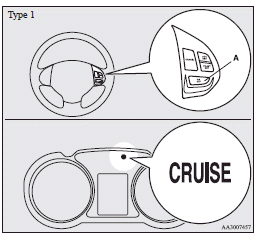
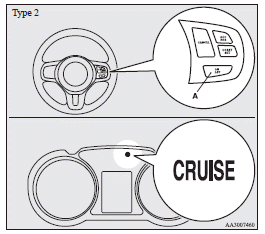
 Note
Note
► If the cruise control is on when the ignition switch is turned to the “LOCK”
or “ACC” position, cruise control will be on automatically the next time you start
the engine. The “CRUISE” indication lamp will also be on.
► If the battery voltage is insufficient, the memory data for the cruise control
may be erased.
As a result, the “CRUISE” indication lamp may not come on when you restart the engine.
If this happens, press the “ON OFF” switch once again to turn on the cruise control.
2. Confirm that the Twin Clutch SST control mode is set to “NORMAL” (on vehicles equipped with Twin Clutch SST). Refer to “Twin Clutch SST control mode”.
Note
► The cruising speed cannot be set when the Twin Clutch SST control mode is set to “SPORT” mode.
3. Accelerate or decelerate to your desired speed, then press and release the “COAST SET” switch (B) when the “CRUISE” indication lamp is illuminated. The vehicle will then maintain the desired speed.
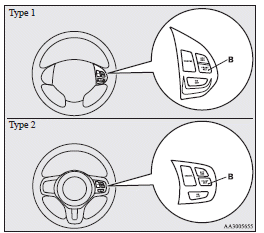
Note
► When you release the “COAST SET” switch, the vehicle speed will be set.
See also:
Position lamp indication lamp
This indication lamp illuminates while the position lamps are on. ...
Pregnant women restraint
WARNING
MITSUBISHI MOTOR SALES Europe B.V. recommends that pregnant women use the
available seat belts. This will reduce the likelihood of injury to both the woman
and the unborn child. The lap b ...
Driver’s switches
The driver’s switches can be used to operate all door windows. A window can be
opened or closed by operating the corresponding switch.
Press the switch down to open the window, and pull up the sw ...