
Antenna
To remove
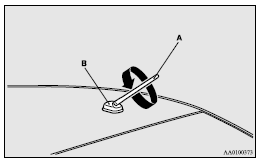
Turn the pole (A) anticlockwise.
To install
Screw the pole (A) clockwise into the base (B) until it is securely retained.
 Note
Note
► Be sure to remove the roof antenna in the following cases:
• When using an automatic car wash.
• When placing a car cover over the vehicle.
• When driving into a structure that has a low ceiling.
See also:
Steering wheel lock
[For vehicles equipped with keyless operation system]
For information on operations for vehicles equipped with the keyless operation
system, refer to “Keyless operation system: Steering wheel loc ...
Parking brake
To park the vehicle, first bring it to a complete stop, fully engage the parking
brake.
To apply
1- Firmly depress and hold the brake pedal, then pull the lever up without pushing
the button a ...
The side airbags and curtain airbags MAY NOT DEPLOY when…
With certain types of side collisions, the vehicle’s body structure is designed
to absorb the shock to help protect the occupants from harm. (The vehicle body’s
side area may deform significan ...