
Error codes
Vehicles with LW/MW/FM digital tuning radio with CD player/CD changer
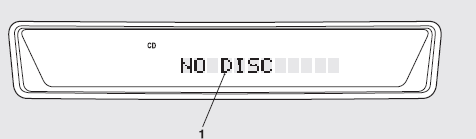
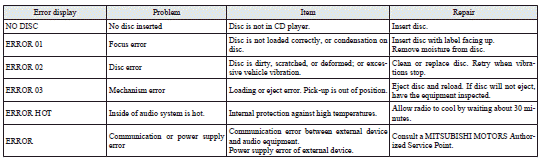
If an error code (1) appears in the display, take action in accordance with the table below.
See also:
Headlamp washer switch*
The headlamp washer can be operated with the ignition switch “ON” position and
the lamp switch at “” or “”
position.
1- Push the button once and the washer fluid will be sprayed on ...
Accessory socket
CAUTION
• Be sure to use a “plug-in” type accessory operating at 12 V and at 120 W
or less.
When using more than one socket at the same time, make sure that the electrical
accessories are ...
Charge warning display
If there is a fault with the charging system, the warning display is displayed
on the information screen in the multi-information display. The warning lamp in
the instrument cluster also illumin ...