
Vehicle information code plate
The vehicle information code plate is located as shown in the illustration.
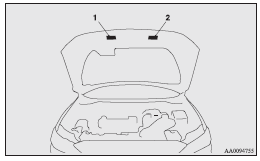
1- Except for vehicles with turbocharger
2- Vehicles with turbocharger
The plate shows model code, engine model, transmission model and body colour code, etc.
Please use this number when ordering replacement parts.
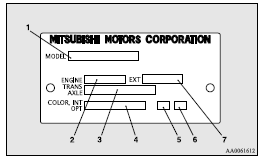
1- Model code
2- Engine model code
3- Transmission model code
4- Body colour code
5- Interior code
6- Option code
7- Exterior code
See also:
Petrol-powered vehicles with turbocharge
► Select engine oil of the proper SAE viscosity number according to the atmospheric
temperature.
SAE 5W-30, 0W-30 and 0W-40 engine oil can only be used if it meets ACEA A3/B3,
A3/B4 or A5 ...
Tachometer
The tachometer indicates the engine speed (r/min).
The tachometer helps you to obtain more economical driving and also warns you
of excessive engine speeds (Red zone).
CAUTION
• When driving ...
Fuel remaining display screen
This displays the amount of fuel remaining.
Caution
► Do not run out of fuel, or the catalytic converter may be adversely affected.
If the warning display appears, refuel as soon as possi ...