
Radio control panel and display
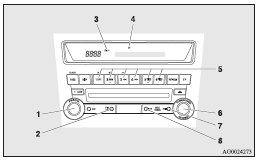
1- PWR (On-Off) switch
2- AM/FM (FM/MW/LW selection) button
3- FM (FM1/FM2/FM3) indicator
4- ST (Stereo) indicator
5- Memory select buttons
6- TUNE switch
7- SEEK (Up-seek) button
8- SEEK (Down-seek) button
See also:
Towing the vehicle by a tow truck
Caution
► This vehicle must not be towed by a tow truck using sling lift type equipment
(Type A) as illustrated. Using a sling lift will damage the bumper and front end.
► Do not tow ...
To adjust height
Adjust the head restraint height so that the centre of the restraint is as close
as possible to eye level to reduce the chances of injury in the event of collision.
Any person too tall for the rest ...
Control panel
A- Temperature control dial
B- Air selection switch
C- Blower speed selection dial
D- Air conditioning switch
E- Mode selection dial
F- Rear window demister switch
NOTE
• On vehicles with ...