
Electrical system
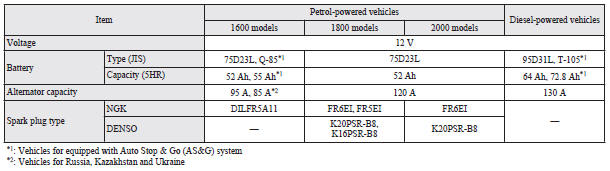
 NOTE
NOTE
• For vehicles equipped with the Auto Stop & Go (AS&G) system, contact a MITSUBISHI MOTORS Authorized Service Point when replacing the battery.
See also:
Turn-signal lever
1- Turn-signals
When making a normal turn, use position (1). The lever will return automatically
when cornering is completed.
2- Lane-change signals
When moving the lever to (2) slightly to cha ...
Suitability for various seating positions
Key of letters inserted in the above table:
U – Suitable for “universal” category restraints approved for use in this mass
group. UF – Suitable for forward–facing “universal” catego ...
Auto go
Depress the clutch pedal while the gearshift lever is in the “N” (Neutral) position.
The “ ” display/indicator turns off and the engine restarts automatically.
...