
Room lamps
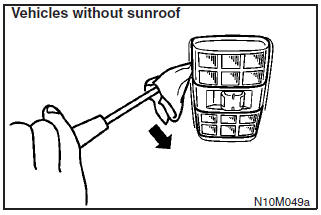
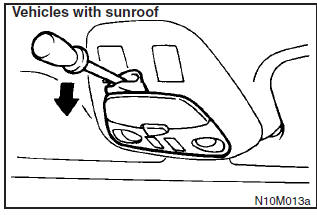
Insert a straight blade (or minus) screwdriver into the notch of the lamp assembly and pry gently to remove the lens.
Remove the lamp bulb from the lamp holder.
NOTE
Wrap a piece of cloth around the straight blade (or minus) screwdriver in order to avoid scratching the lens.
See also:
For cold and snowy weather
Ventilation slots
The ventilation slots in front of the windscreen should be kept clear of leaves
or brushed clear after heavy snowfall, so that the operation of the heating and
ventilation syste ...
Genuine parts
MITSUBISHI MOTORS has gone to great lengths to bring you a superbly crafted automobile
offering the highest quality and dependability.
Use MITSUBISHI MOTORS Genuine Parts, designed and manufactured ...
Procedure for replacing the remote control switch battery
1. Before replacing the battery, remove static electricity from your body by
touching a metal grounded object.
2. Remove the screw (A) from the remote control switch.
3. With the MITSUBISHI mark ...