
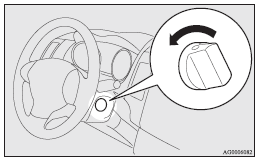
When turning from “ACC” to “LOCK”
[Vehicles equipped with M/T] Put the gearshift lever into the “N” (Neutral) position, and slowly turn the ignition switch to the “LOCK” position while pressing it.
[Vehicles equipped with CVT or Twin Clutch SST] First, set the selector lever (CVT) or the gearshift lever (Twin Clutch SST) to the “P” (PARK) position, and then slowly turn the ignition switch to the “LOCK” position while pressing it.
 Note
Note
► Vehicles equipped with CVT or Twin Clutch SST, the ignition switch cannot be turned to the “LOCK” position unless the selector lever (CVT) or the gearshift lever (Twin Clutch SST) is in the “P” (PARK) position.
 Caution
► Do not turn the ignition switch to the “LOCK” position while driving. The
steering wheel will be locked, causing loss of control.
► If the engine is stopped while driving, the brake servomechanism will cease to
function and braking efficiency will deteriorate.
Also, the power steering system will not function and it will require greater manual
effort to operate the steering.
► Do not leave the ignition switch in the “ON” or “ACC” position for a long time
when the engine is not running, doing so will cause the battery to be discharged.
► Do not turn the ignition switch to the “START” position when the engine is running,
doing so could damage the starter motor.
See also:
Ventilation slots
The ventilation slots in front of the windscreen should be brushed clear after
a heavy snowfall so that the operation of the heating and ventilation systems will
not be impaired. ...
SRS warning lamp/display
Warning lamp
The warning lamp/display illuminates when there is a fault with the system. In
addition, the warning display will be displayed on the information screen in the
multi-information di ...
To operate without using the keyless operation function
Emergency key
The emergency key is built into the keyless operation key. If the keyless operation
function cannot be used, for example because the keyless operation key battery has
worn out or th ...