
Ignition switch turn-off reminder system
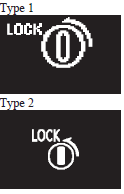
When the ignition switch is in any position other than the “LOCK” (PUSH OFF) position, if you close all the doors and the rear hatch then try to lock the doors and rear hatch by pressing the driver’s or front passenger’s door lock/unlock switch, or the rear hatch LOCK switch, a warning is issued with the warning display and the buzzer buzzing for about 3 seconds and you cannot lock the doors and rear hatch.
See also:
How to enter frequencies in the memory
Manual setting
You can assign to the memory select buttons (8) a maximum of 12 stations in the
UKW band (6 U1 stations and 6 U2 stations), 6 stations in the MW band and 6 stations
in the LW ban ...
Front console tray
The front console tray is on the front console part.
Note
► Do not use the front console tray as an ashtray.
This could cause fire or damage the tray. ...
Rear fog lamp indication lamp
This lamp illuminates while the rear fog lamp is on. ...