
Procedure for replacing the remote control switch battery
1. Before replacing the battery, remove static electricity from your body by
touching a metal grounded object.
2. With the MITSUBISHI mark facing you, insert the cloth-covered tip of a straight
blade (or minus) screwdriver into the notch in the case and use it to open the case.
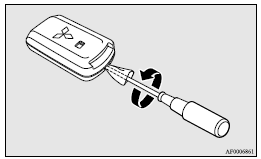
 Note
Note
► Be sure to perform the procedure with the MITSUBISHI mark facing you. If the MITSUBISHI mark is not facing you when you open the case, the transmitter may come out.
3. Remove the old battery.
4. Install a new battery with the + side (A) up.
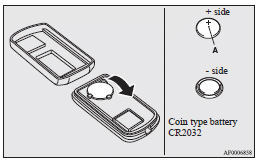
5. Close the case firmly.
6. Check the keyless operation function to see that it works.
Note
► You may purchase a replacement battery at an electric appliance store.
► A MITSUBISHI MOTORS Authorized Service Point can replace the battery for you if
you prefer.
 Caution
► When the remote control switch case is opened, be careful to keep water, dust, etc. out. Also, do not touch the internal components.
See also:
Fuses
Fuse block location
To prevent damage to the electrical system due to shortcircuiting or overloading,
each individual circuit is provided with a fuse.
There are fuse blocks in the passenger compar ...
Heater/Air conditioning
The heater/air conditioning can only be used while the engine is running. ...
Disconnection and connection
To disconnect the battery cable, stop the engine, first disconnect the negative
(-) terminal and then the positive (+) terminal.
When connecting the battery, first connect the positive (+) terminal ...