
Keyless entry system
Press the remote control switch, and all doors and the rear hatch will be locked or unlocked as desired.
It is also possible to operate the door outside rear-view mirrors.
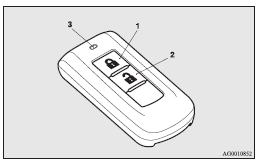
1- LOCK  switch
2- UNLOCK  switch
3- Indication lamp
See also:
Reversing sensor system
This system operates when you are backing the vehicle.
It uses corner and back sensors to detect an obstacle and sounds a buzzer to
inform you of the approximate distance to the obstacle.
CAUTION ...
Operating a music player connected via Bluetooth®
For the operation of a music player connected via Bluetooth®, refer to “To play
tracks from a Bluetooth ® device”. ...
Washer fluid
Check the washer fluid level in the container. If the level is low, replenish
as required.
NOTE
The washer fluid container serves the windscreen, rear window, and headlamps
(if so equipped). ...