
System preparation mode (approx. 20 seconds)
(The buzzer sounds intermittently and the security indicator (A) blinks.)
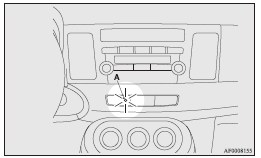
The system preparation time extends from the point at which all of the doors and rear hatch are locked by pressing the LOCK switch on the remote control switch or the keyless operation function to the point at which the system armed mode goes into effect.
During this time, it is possible to temporarily open a door or the rear hatch without using the keyless entry system or the keyless operation function and without causing the alarm to sound (for example, when you forget something inside the vehicle or realize that a window is open).
See also:
Headlamps (high/low beam, for vehicles with high intensity discharge headlamps)
Do not attempt to disassemble or repair headlamps, and do not attempt to replace
their bulbs.
Warning
► A high voltage is present in the power circuit and in the bulbs and bulb
terminals. ...
Retracting and extending the outside mirrors
The outside mirror can be folded in towards the side window to prevent damage
when parking in narrow areas.
Caution
► Do not drive the vehicle with the mirror folded in.
The lack of rearwa ...
Automatic transmission INVECS–II 4A/T, Sports Mode 4A/T (Intelligent & Innovative
Vehicle Electronic Control System II)
Designed for optimum control and equipped with adaptive control capabilities,
the electronically controlled transmission optimally matches gear shifts to almost
all driving and road conditions.
C ...