
Lock switch
When this switch is operated, the passenger’s switches cannot be used to open or close the door windows and the driver’s switch cannot open or close any door windows other than the driver’s door window.
To unlock, press it once again.
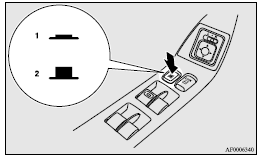
1- Lock
2- Unlock
 Warning
► A child may tamper with the switch at the risk of its hands or head being trapped in the window. When driving with a child in the vehicle, please press the window lock switch to disable the passenger’s switches.
See also:
Map lamps
Push the lens (A) to turn on the lamp. Push it again to turn it off.
...
Economical driving
For economical driving, there are some technical requirements that have to be
met. The prerequisite for low fuel consumption is a properly adjusted engine. In
order to achieve longer life of the v ...
What to do if the engine speed becomes unstable after the battery is replaced
If the engine speed becomes unstable after the battery is replaced, reset the
engine using the following method:
1. Stop the vehicle in a safe place. 2. Place the gearshift lever (manual transmissi ...