
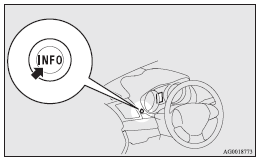
Multi-information meter switch
Each time the multi-information meter switch is operated, a sound is emitted and the multi-information display changes between information such as warnings, odometer, tripmeter, service reminder, engine coolant temperature (Type 1), average and momentary fuel consumption, driving range, average speed, and ACD (Active centre differential system) operation display.
It is also possible to change elements such as the language and units used on the multi-information display by operating the multi-information meter switch.
See also:
Headlamp flasher
The high-beams flash when the lever is pulled slightly (2), and will go off when
it is released.
When the high-beam is on, the high-beam indication lamp in the instrument cluster
will illuminate. ...
Vehicle care
In order to maintain the value of your vehicle, it is necessary to perform regular
maintenance using the proper procedures. Always maintain your vehicle in compliance
with any environmental pollut ...
Steering wheel height adjustment
1. Release the tilt lock lever while holding the steering wheel up.
2. Adjust the steering wheel to the desired height.
3. Securely lock the steering wheel by pulling the tilt lock lever fully upwar ...