
Twin Clutch SST control mode
When the ignition switch is set to the “ON” position, operate the Twin Clutch SST control mode switch (A) to change the control mode.
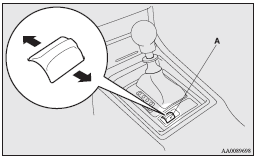
When the engine is started, the control mode is automatically set to the “NORMAL” mode. Use the following procedures to change the control mode.
To shift from “NORMAL” mode to “SPORT” mode
While the vehicle is stopped or being driven, push the Twin Clutch SST control mode switch forward.
To shift from “SPORT” mode to “NORMAL” mode
While the vehicle is stopped or being driven, push the Twin Clutch SST control mode switch rearward.
 Note
Note
► If the Twin Clutch SST control mode switch is continuously pushed after a control
mode has been selected, an erroneous operation prevention function operates and
the control mode is automatically set to the “NORMAL” mode.
If you would like to select a control mode again, return the ignition switch to
the “ACC” or “LOCK” position and restart the engine. Then, push the Twin Clutch
SST control mode switch.
See also:
Filling the fuel tank
Warning
► When handling fuel, comply with the safety regulations displayed by garages
and filling stations.
► Before removing the fuel cap, be sure to get rid of your body’s static ...
Seat belt inspection
• Check the belts for cuts, worn or frayed webbing and for cracked or deformed
metallic parts. Replace the belt assembly if it is defective.
• A dirty belt should be cleaned with neutral deterg ...
Engine compartment
Clean the engine compartment at the beginning and end of winter. Pay particular
attention to flanges, crevices and peripheral parts where dust containing road chemicals
and other corrosive materia ...