
Automatic mode
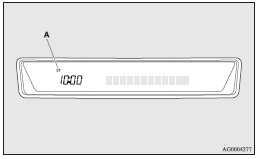
The automatic adjustment mode can set the local time automatically by using the signal from local RDS stations. In this mode, CT (A) is shown in the display. Refer to “Radio data system (RDS)” on pages 5-22, 5-36.
See also:
Vehicles without sunroof
Room lamp
1 (OFF) - The lamp goes out. 2 ()
- The lamp illuminates when a door or the tailgate is opened and goes out when it
is closed. 3 (ON) - The lamp illuminates.
Spot lamps*
4 - The l ...
Active stability control (ASC)
The Active Stability Control (ASC) takes overall control of the anti-lock brake
system, traction control function and stability control function to help maintain
the vehicle’s control and tracti ...
Twin Clutch SST control mode
Select the control mode from the following two types to suit the driving conditions.
Note
► When continuously driving on closed circuit tracks or at other locations where
the engine is op ...