
Digital clock
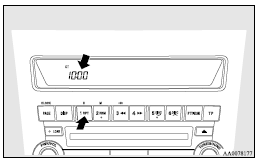
Automatic mode and manual mode are available for digital clock adjustment.
Select the automatic mode or the manual mode by performing the following operations: 1. Press the PWR switch (A) to turn ON the audio system.
2. Enter the function setup mode by pressing the TUNE switch (B) for 2 sec. or longer.
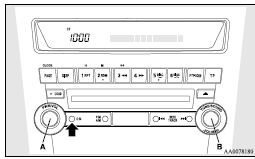
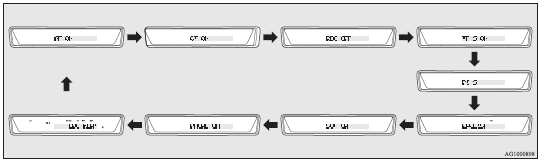
3. Press the TUNE switch (B) repeatedly to select the CT (Clock Time) mode.
The order is: AF → CT → REG → TP-S → PI-S → Language of PTY display → SCV → PHONE → Function setup mode OFF. (Refer to “Function setup mode” on pages 5-25, 5-39.)
 Note
Note
► Although “PHONE” appears on the display, the PHONE function is inoperative.
4. Turn the TUNE switch (B) left and right and select either ON or OFF.
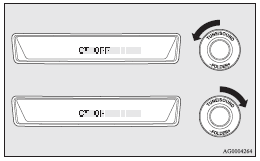
CT ON- Automatic mode
CT OFF- Manual mode
Note
► After selecting a mode, you can leave the function setup mode by taking either
of the following steps:
• Press the TUNE switch (B) for at least 2 seconds.
• Make no entry for 10 seconds.
See also:
Charge warning lamp
This lamp illuminates when the ignition switch is turned to the “ON” position,
and goes off after the engine has started.
A warning is also displayed on the multiinformation display.
Cautio ...
Alarm activation
When the system is in the system armed mode, the alarm will be activated as follows
if the vehicle is unlocked or if any of the doors, tailgate or bonnet is opened
using a method other than the ke ...
Driver’s switches
The driver’s switches can be used to operate all door windows. A window can be
opened or closed by operating the corresponding switch.
Press the switch down to open the window, and pull up the ...