
Doors
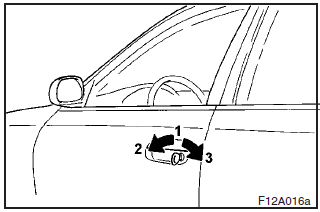
Operation from outside the vehicle
1- Insert or remove the key
2- Lock
3- Unlock
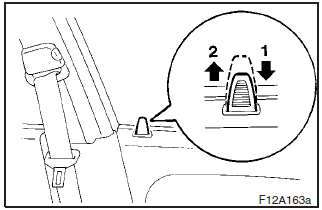
Operation from inside the vehicle
1- Lock
2- Unlock
Pull the inside door handle toward you to open the door.
When the inside door handle of the front door is pulled, the door can be opened even if the door is locked.
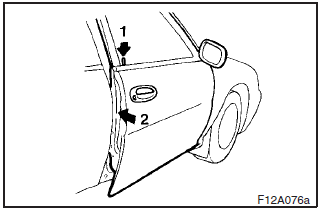
To lock the front door without a key
Press the inside lock button (1), and close the door (2).
“Forgotten-key-prevention” mechanism
If the lock button of the driver’s door is pressed while the driver’s door is opened, the lock will be automatically released.
To lock the rear doors
Press the inside lock button (1), and close the door (2).
CAUTION
(1) Make sure the doors are closed: driving with doors incompletely closed
is very dangerous.
(2) Never leave children in the vehicle unattended.
(3) Be
careful not to lock the doors while the key is inside the vehicle.
See also:
Starting
Tips for starting
► Do not operate the starter motor continuously longer than 10 seconds; doing
so could run down the battery. If the engine does not start, turn the ignition switch
back to ...
Tools, jack and tyre repair kit
Storage
The tools, jack and tyre repair kit are stowed in the luggage compartment.
The storage location of the tools, jack and tyre repair kit should be remembered
in case of an emergency.
1- T ...
Position lamps (for vehicles equipped with high intensity discharge headlamps)
1. To create enough work space, turn the steering wheel all the way in the direction
opposite to the side you wish to replace.
2. Remove the clips (A) and screws (B) to turn up the cover (C).
...