
Demisting of the windscreen and door windows
CAUTION
For safety, make sure you have a clear view through all windows.
To remove frost or mist from the windscreen and door windows, use the mode selection
dial (“ ” or “
 ”).
”).
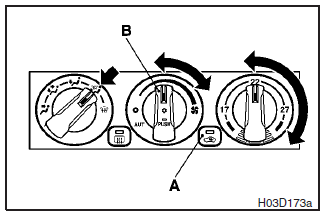
 - To keep the windscreen and door
windows clear of mist, and to keep leg area heating (when driving in rain or snow).
- To keep the windscreen and door
windows clear of mist, and to keep leg area heating (when driving in rain or snow).
1- Set the air selection switch (A) to the outside position.
2- Set the mode
selection dial to the “ ” position.
3- Select the desired blower speed by turning the blower speed selection dial.
4- Select the desired temperature by turning the temperature control dial.
5-
Push the air conditioning switch (B).
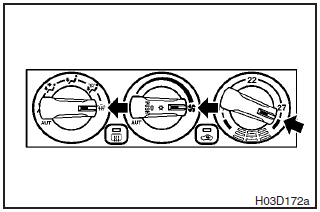
 - For quick demisting
1- Set the mode selection dial to the “ ”
position.
”
position.
2- Set the blower speed to the maximum blower speed position.
3- Set
the temperature to the maximum temperature position.
NOTE
(1) While the mode selection dial is set to the “”
position, the air conditioning will operate automatically and the outside air position
will also be selected automatically. This is done for optimum performance.
(2)
To demist effectively, direct the air flow from the side ventilators toward the
door windows.
(3) Do not set the temperature control dial around the max. cool
position. Cool air will blow against the window glasses and form mist on them.
See also:
Fuel gauge
The fuel gauge indicates the fuel level in the fuel tank irrespective of the
ignition switch position.
0- Empty 1- Full
CAUTION
Do not drive with an extremely low fuel level; running out of fue ...
For the rear seat
In order to use the cup holder, allow the armrest (A) to drop down.
...
Windscreen wipers
Type 1
- Misting function. The wipers
will operate once. - Off
- Intermittent operation at intervals
of approximately 4 seconds –Slow
–Fast
Type 2
- Misting function. The wipers wil ...