
Licence plate lamps
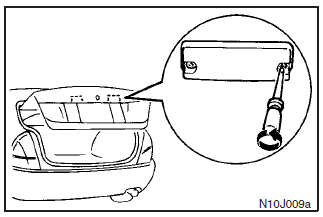
Remove the lens mounting screws, remove the lens, then remove the bulb by pulling out.
See also:
A/T mode changeover switch (Except for vehicles with Sports mode)
Two drive modes, “AUTO” and “HOLD”, can be selected.
Each time you press the switch, the “AUTO” and “HOLD” modes will switch alternately.
When the “HOLD” mode is selected, the ...
Rear fog lamp switch
The rear fog lamp can be operated when the headlamps or front fog lamps (if so
equipped) turn on.
Push the switch to turn on the gear fog lamp, and push the switch again to turn
it off. The ind ...
Infants and small children
When transporting infants and small children in your vehicle, follow the instruction
given below.
Instruction:
► For small infants, an infant carrier should be used. For small children who ...