
Instruments
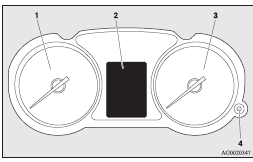
1- Tachometer ®
2- Multi-information display ®
Information screen display list ®
3- Speedometer (km or mph + km/h)
4- Daytime dipper button (meter illumination control) ®
See also:
Brake assist system
The brake assist system is a device assisting drivers who cannot depress the
brake pedal firmly when it is necessary to do so (such as in emergency stop situations)
and provides greater braking fo ...
Dipper (High/Low beam change)
When the lamp switch is in the position,
the beam changes from high to low (or low to high) each time the lever is pulled
fully (1). While the high beam is on, the high-beam indication lamp in th ...
Waiting
For short waiting periods, such as at traffic signals, the gearshift lever can
be left in position and the vehicle held stationary with the service brake.
For longer waiting periods with the engine ...