
Returning to the factory settings
All of the function settings can be returned to their factory settings.
1. Press and hold the multi-information meter switch for about 2 seconds or more to switch from the setting mode screen to the menu screen.
Refer to “Changing the function settings (when the ignition switch is “ON”)”.
2. Lightly press the multi-information meter switch to select “RESET” (returning
to the factory settings).
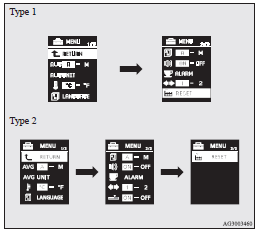
3. When you press and hold the multi-information meter switch for about 5 seconds or more, the buzzer sounds and all of the function settings are returned to the factory settings.
 Note
Note
► The factory settings are as follows.
• Average fuel consumption and average speed reset mode: A (Auto reset)
• Fuel consumption display unit: L/100 km
• Temperature unit: °C (Celsius)
• Display language: ENGLISH or RUSSIAN
• Cooperative language setting: A
• Operation sounds: ON (Operation sounds on)
• “REST REMINDER” display: OFF
• Turn-signal sound: Turn-signal sound 1
• Momentary fuel consumption with the green bar graph (Type 2): ON
See also:
The side airbags and curtain airbags MAY NOT DEPLOY when…
With certain types of side collisions, the vehicle’s body structure is designed
to absorb the shock to help protect the occupants from harm. (The vehicle body’s
side area may deform significan ...
Wiper blades
Use a soft cloth and glass cleaner to remove grease, dead insects, etc., from
the wiper blades. Replace the wiper blades when they no longer wipe properly. (Refer
to page 9–18) ...
Polishing
The vehicle should only be polished if the paintwork has become stained or lost
its lustre. Matt-finish parts and plastic bumpers must not be polished, polishing
these parts will stain them or dam ...