
If your vehicle tows another vehicle
1. Take out the towing hook, wheel nut wrench and jack bar. Refer to “Tools and jack”.
2. Cover the tip of the jack bar with a cloth, then use it to remove the cover (D) that is located on the rear bumper.
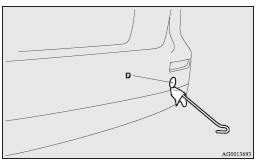
3. Use the wheel nut wrench (E) to firmly attach the towing hook (F).
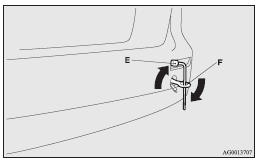
4. Always attach the tow rope to the towing hook. Otherwise, the instructions are the same as for “When being towed by another vehicle”.
5. When finished towing, remove the towing hook, and stow it in the specified location.
Refer to “Tools and jack”.
When installing the cover, align the hook with the cut out area on the vehicle, and firmly insert.
 Note
Note
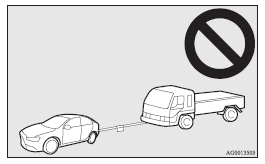
► Do not tow a vehicle heavier than your own vehicle.
See also:
Emergency broadcasts
If an emergency broadcast is caught while receiving a UKW broadcast or playing
back a cassette tape with the ignition switch in “ACC” or “ON” position, the display
will show “ALARM” an ...
For cold and snowy weather
Ventilation slots
The ventilation slots in front of the windscreen should be kept clear of leaves
or brushed clear after heavy snowfall, so that the operation of the heating and
ventilation syste ...
Display brightness adjustment / Display unit selection
Display brightness adjustment
1. Press the “H” button while pressing the button (A) to activate the display
brightness selection function.
2. Adjust the brightness by moving the cursor with ...