
If the keyless operation key is not operating properly
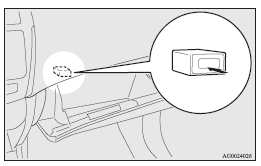
Insert the keyless operation key into the key slot in the glove box. Starting the engine and changing the operation mode should now be possible.
Remove the keyless operation key from the key slot after starting the engine or changing the operation mode.
 NOTE
NOTE
• Do not insert into the key slot anything other than the keyless operation key.
This could cause damage or a malfunction.
• Remove the object or additional key from the the keyless operation key before
inserting the key into the key slot.
The vehicle may not be able to receive the registered ID code from the registered key.
Therefore, the engine may not start and the operation mode may not change.
Keyless operation key reminder

If the operation mode is in OFF and the driver’s door is opened with the keyless operation key in the key slot, a warning is issued with the warning display and the buzzer buzzing for approximately 3 seconds to remind you to remove the key.
See also:
USB input terminal
You can connect your USB memory device or iPod* to play music files stored in
the USB memory device or iPod.
The following explains how to connect and remove a USB memory device or iPod.
Refer to ...
To play USB memory device tracks via voice operation (vehicles with Bluetooth
® 2.0 interface)
Desired tracks can be selected and played from your USB memory device by “Artist”,
“Album”, “Playlist” and “Genre” using voice commands.
For information concerning the voice recogni ...
Drive mode indicator display screen
This displays the 4WD status.
If you select “4WD LOCK” mode with the drive mode selector, “4WD LOCK” is displayed;
if you select “4WD AUTO” mode, “4WD” is displayed.
Nothing is d ...