
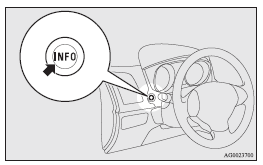
Multi-information meter switch
Each time the multi-information meter switch is operated, a sound is emitted and the multi-information display changes between information such as warnings, odometer (Type 1), tripmeter, service reminder, engine coolant temperature (Type 1), average and momentary fuel consumption, driving range, and average speed.
It is also possible to change elements such as the language and units used on the multi-information display by operating the multi-information meter switch.

 mark display screen (when the ignition
switch or the operation mode is OFF)
mark display screen (when the ignition
switch or the operation mode is OFF)
If you press the multi-information meter switch and return from the warning display
screen to the previous screen, the
mark is displayed.
Refer to “To return to the screen displayed before the warning display”.
This mark is also displayed if there is another warning other than the one displayed.
When the cause of the warning display is eliminated, the
mark goes out automatically.
 NOTE
NOTE
• When the mark is displayed,
the warning display screen can be redisplayed on the information screen.
Refer to “Information screen (when the ignition switch or the operation mode is OFF)”.
Refer to “Information screen (when the ignition switch or the operation mode is ON)”.
See also:
Indication and warning lamp list
1. “Adaptive Front lighting System (AFS) warning lamp”
2. Position lamp indication lamp ®
3. High-beam indication lamp ®
4. Charge warning lamp ®
5. Turn-signal indication lamps/Hazard wa ...
Manual reset mode
► When the average fuel consumption is being displayed, if you hold down the
multi-information meter switch, the average fuel consumption displayed at that time
is reset. ...
Bluetooth® 2.0 interface
The Bluetooth® 2.0 interface allows for making/receiving hands-free calls in
the vehicle using a Bluetooth ® compatible cellular phone based on the wireless
communication technology commonly kno ...