
Rear window wiper and washer
The rear window wiper and washer switch can be operated with the ignition switch or the operation mode in ON or ACC.
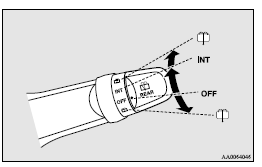
INT- The wiper operates continuously for several seconds then operates intermittently at intervals of about every 8 seconds
OFF- Off

The washer fluid will be sprayed onto the rear window when the knob is turned fully in either direction.
The wipers operate automatically several times while the washer fluid is being sprayed.
 NOTE
NOTE
• The rear window wiper will automatically perform several continuous operations if the gearshift lever or the selector lever is put in the “R” position while the windscreen wipers or the rear window wiper is operating. (automatic operation mode).
After the automatic operation, the rear window wiper will stop operating if the knob is in the “OFF” position. If the knob is in the “INT” position, the rear window wiper will return to the intermittent operation.
It is possible to set the rear window wiper to perform the automatic operation only if the gearshift lever or the selector lever is put in the “R” position while the rear window wiper is operating with the knob in the “INT” position.
For further information, we recommend you to consult a MITSUBISHI MOTORS Authorized Service Point.
• If the knob is in the “OFF” position, turn the knob to the “INT” position twice quickly to operate the rear window wiper continuously.
(continuous operation mode) Turn the knob to the “OFF” position to stop the rear window wiper continuous operation.
• The interval for intermittent operation can be adjusted.
For further information, we recommend you to consult a MITSUBISHI MOTORS Authorized Service Point.
On vehicles equipped with MITSUBISHI Multi-Communication System (MMCS), screen operations can be used to make the adjustment.
Refer to the separate owner’s manual for details.
See also:
Ignition switch
In order to prevent theft, the engine will not start unless a preregistered keyless
operation key is used.
(Engine immobilizer function)
LOCK (PUSH OFF)
The position in which the steering wheel ...
ACD (Active centre differential system
The ACD is a system that improves acceleration performance and straight-ahead
stability by regulating the differential limiting action and power drive distribution
of the centre differential.
Ca ...
Warning lamps
Brake warning lamp
This lamp illuminates when the ignition switch is turned to the “ON” position
or the operation mode is put in ON, and goes off after a few seconds.
Always make sure that t ...