
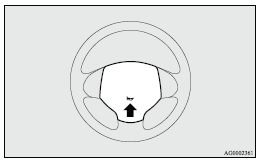
Horn switch
Press the steering wheel on or around the
 mark.
mark.
See also:
Lamps (headlamps, fog lamp, etc.) auto-cutout function
• If the following operation is performed while the lamp switch is in the
position, the lamps will automatically
go out when the driver’s door is opened.
[Except for vehicles equipped with ke ...
Parking brake
To park the vehicle, first bring it to a complete stop, fully apply the parking
brake lever sufficiently to hold the vehicle. ...
Alarm activation
The turn-signal lamps blink and the siren sounds for approximately 30 seconds.
Refer to “Alarm activation”.
Note
► The alarm will resume if unlawful actions are taken again, even if the ...