
Lock switch
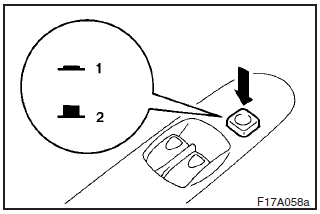
When this switch is operated, the passenger’s switches cannot be used to open or close the door windows and the driver’s switch cannot open or close any door windows other than the front door windows. To unlock, press it once again.
1- Lock
2- Unlock
WARNING
A child may tamper with the switch at the risk of its hands or head being trapped in the window. When driving with a child in the vehicle, please press the window lock switch to disable the passenger’s switches.
See also:
Manual remote-controlled outside rear-view mirrors*
Adjust the mirrors by operating the lever as indicated by the arrows.
1- Left and right 2- Up and down ...
Brake pedal free play
Stop the engine, depress the brake pedal several times, and press down the pedal
with your fingers until initial resistance is felt. This distance should be within
the specified range.
A- Free ...
Driving hints
(1) With ABS fitted, steering during sudden braking (when the ABS functions)
differs slightly from when the brakes are not being applied. Steer the vehicle
carefully in these conditions.
(2) Alwa ...