
Wheel covers
To removeWrap the tip of the jack bar with a cloth, insert it deeply into the notch provided in the wheel cover, and pry the cover away from the wheel. Using the same procedure at the other wheel cover notches, work the wheel cover away from the wheel to remove it completely.
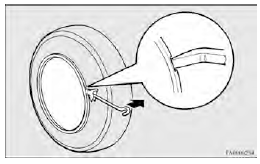
 CAUTION
• Removing the cover with your hands may cause injury to the fingers.
 NOTE
NOTE
• The wheel cover is made of plastic. Pry it loose carefully.
To install
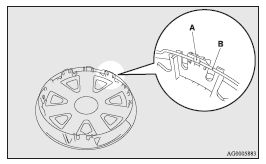
1. Make sure the tabs (A) of the back of the wheel cover are not broken and correctly fitted on the rings (B). If in doubt, do not install the wheel cover and consult a MITSUBISHI MOTORS Authorized Service Point.
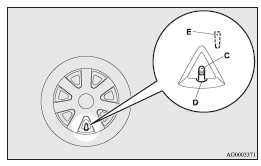
2. Align the tyre valve stem (C) with the cut out area (D) in the wheel cover.
NOTE
There is a symbol (E) on the back of the wheel cover indicating the cut out area.
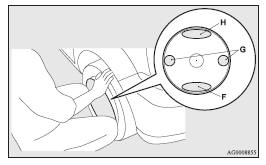
3. Push the underside (F) of the wheel cover into the wheel.
4. Gently push both sides (G) of the wheel cover and hold them in place with
both knees.
5. Gently push around the top (H) of the wheel cover.
See also:
Rear seat
Folding the seatback forward
The right and left seatbacks can be folded forward separately.
Push the seatback forward
Push the seatback until it clicks and check if the seatback is locked.
NOTE
...
CD control panel and display
1- AM/FM button
2- CD (CD mode changeover) button
3- PWR (On-Off) switch
4- PAGE (Title scroll) button
5- DISP (Display) button
6- RPT (Repeat) button
7- RDM (Random) button
8- (Fast-rever ...
Full-time 4WD
Full-time 4WD vehicles are propelled by engine power distributed constantly and
appropriately to all 4 wheels.
Not only does this ensure better handling on dry, paved roads but also permits
bette ...