
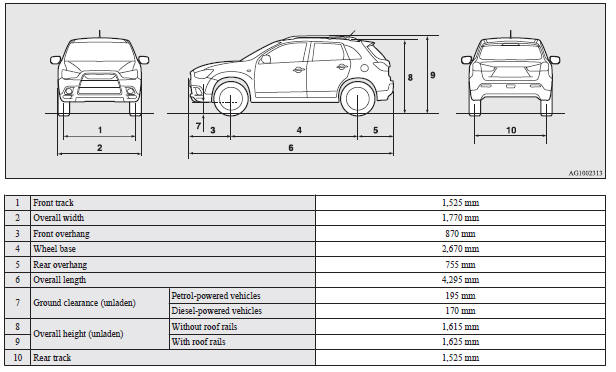
Vehicle dimensions

See also:
Braking
All the parts of the brake system are critical to safety.
We recommend you to have the vehicle checked at regular intervals according to
the service booklet.
Caution
► Avoid driving habits ...
Engine oil level warning display
When the ignition switch is in the “ON” position, if it is suspected that the
engine oil level has increased excessively, the warning display is displayed on
the information screen in the mu ...
Front room & map lamps
When replacing the bulb, put the front room & map lamps switch into the “OFF”
position.
1. Insert a straight blade (or minus) screwdriver with a cloth over its tip into
the notch of the l ...