
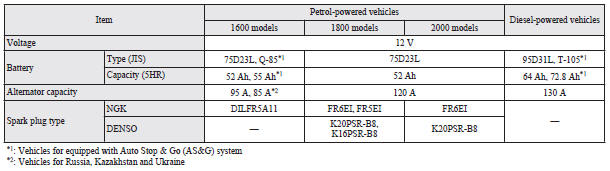
Electrical system
 NOTE
NOTE
• For vehicles equipped with the Auto Stop & Go (AS&G) system, contact a MITSUBISHI MOTORS Authorized Service Point when replacing the battery.
See also:
Safety
A 2013 base Lancer with front-wheel drive scores an overall four out of five
stars in National Highway Traffic Safety Administration crash tests. The Lancer
receives the Insurance Institute for Hi ...
Twin Clutch SST control mode display screen (vehicles equipped with Twin Clutch
SST)
The operation status of the Twin Clutch SST control mode is displayed.
Refer to “Twin Clutch SST control mode”. ...
To reduce the glare
Type 1
The lever (A) at the bottom of the mirror can be used to adjust the mirror to
reduce the glare from the headlamps of vehicles behind you during night driving.
1- Normal
2- Anti-glare
Ty ...