
Removal of head restraints
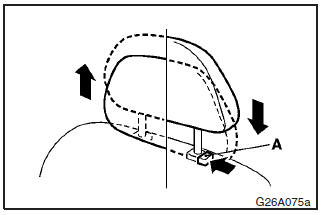
To remove the head restraints, lift the head restraint with the height adjusting knob (A) pushed in.
To install the head restraints, first confirm that they are facing in the correct direction, and then insert them into the seatback while pressing the height adjusting knobs (A) in the direction indicated by the arrows.
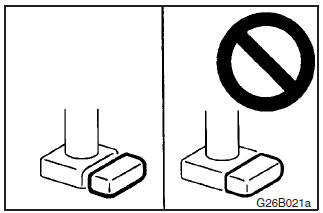
Confirm that the height adjusting knobs (A) are correctly adjusted as shown in the illustration, and also lift the head restraints to ensure that they do not come out of the seatback.
WARNING
It is dangerous to drive with incorrectly adjusted head restraints or without head restraints installed; always have them correctly fitted when using the vehicle.
Failure to do so could cause serious injury if involved in an accident.
CAUTION
The head restraints for the front, rear outboard and rear centre seats differ in shape.
When installing head restraints, make sure the front, rear outboard and rear centre head restraints are fitted in their respective seats.
Failure to do so could cause serious injury if involved in an accident.
See also:
Clutch fluid
Petrol-powered vehicle
To check the clutch fluid
To check the clutch fluid The clutch fluid in the master cylinder should be checked
when performing other underhood services. In addition, the syst ...
Outside rear-view mirrors
To adjust the mirror position
The outside rear-view mirrors can be operated when the ignition switch or the
operation mode is in ON or ACC.
WARNING
• Do not attempt to adjust the rear-view mir ...
Genuine parts
MITSUBISHI MOTORS has gone to great lengths to bring you a superbly crafted automobile
offering the highest quality and dependability.
Use MITSUBISHI MOTORS Genuine Parts, designed and manufactured ...