
Combination headlamps, dipper and turn signal switch
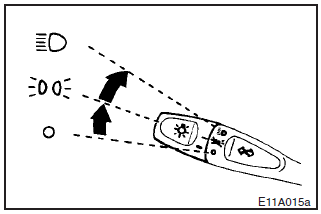
Headlamps
Rotate the switch to turn on the lamps.
 –All lamps off
 –Position, tail, licence–plate, and
instrument panel lamps on
–Position, tail, licence–plate, and
instrument panel lamps on
 –Headlamps on and other lamps remain
on
–Headlamps on and other lamps remain
on
Lamp monitor system
If the driver’s door is opened when the key is in the “LOCK” or “ACC” position or removed from the ignition switch with the lamp switch in the “ ” or “ ” position, a buzzer will sound to remind the driver to turn off the lamps.
Turn off the lamp switch, and the buzzer will stop.
[Vehicles with Daytime Running Lamp]
When the ignition key is in the “ON” position and the lamp switch is set to the
“” position, the low beam of the headlamps,
tail lamps, etc., will illuminate.
NOTE
(1) Do not leave the headlamps and other lamps on for too long time while
the engine is stationary. A run–down battery could result.
(2) When it rains,
or when the vehicle has been washed, the inside of the lens sometimes becomes foggy.
This is the same phenomenon as when window glass mists up on a humid day, and does
not indicate a functional problem. When the lamp is switched on, the heat will remove
the fog. However, if water gathers inside the lamp, please go to an authorized MITSUBISHI
dealer for a check.
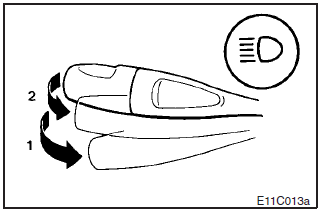
Dipper (High/Low beam change)
When the lamp switch is in the “ ”
position, the beam changes from high to low (or low to high) each time the lever
is pulled to (1). While the high beam is on, the high beam indication lamp in the
instrument cluster will also illuminate.
”
position, the beam changes from high to low (or low to high) each time the lever
is pulled to (1). While the high beam is on, the high beam indication lamp in the
instrument cluster will also illuminate.
Headlamp flasher
The high beams flash when the lever is pulled slightly to (2), and will go off when it is released.
When the high beam is on, the high beam indication lamp in the instrument cluster will also illuminate.
NOTE
The high beams can also flash when the lamp switch is OFF.
See also:
Service reminder
This displays the distance and number of months until the next periodic inspection.
Refer to “Service reminder”. ...
SRS servicing
The entire SRS including air bag and pretensioner seat belt must be inspected
by an authorized MITSUBISHI dealer after 10 years.
WARNING
(1) Any maintenance performed on or near the components of ...
Driving, alcohol and drugs
Driving after drinking alcohol is one of the most frequent causes of accidents.
Your driving ability can be seriously impaired even with blood alcohol levels
far below the legal minimum.
If you ha ...