
Multi centre display
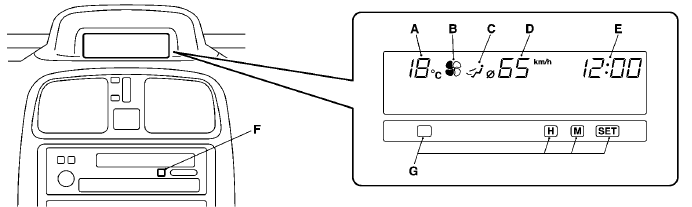
When the ignition switch is in the ”ACC” position, the outside temperature and clock are displayed in the multi centre display. When the ignition switch is in the ”ON” position, the average fuel consumption is displayed besides outside temperature and digital clock.
If your vehicle is equipped with an automatic air conditioning system, set temperature, blower speed and air flow are displayed. (Refer to ”Automatic air conditioning” on page 6–36.)
A- Outside temperature / Set temperature*1
B- Blower speed*1
C- Air flow*1
D- Average fuel consumption*2
E- Digital clock
F- DISP button (For vehicles
with a MITSUBISHI genuine audio)
G- Display brightness / display unit selection
button
*1: Option
*2: Average fuel consumption:
For vehicles without MITSUBISHI genuine audio,
only average fuel consumption is displayed.
For vehicles with MITSUBISHI genuine
audio, driving range and average speed can be displayed besides average fuel consumption
by pushing the DISP button in the audio unit.
NOTE
(1) The display unit (ex. km or mile) and brightness can be changed as desired.
(Refer to ”Display brightness adjustment/Display unit selection” on page 4–31.)
When the system cannot provide a definite value for average fuel consumption/driving
range/average speed, it is displayed as ”– – –”.
(2) The figure of the display
varies according to the conditions under which a vehicle is travelling (road conditions,
the manner in which the vehicle is being driven, etc.). Observe display for reference
because the figure of the display may differ from the actual figure.
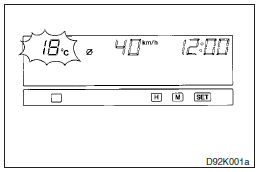
Outside temperature
This value shows the outside temperature of the vehicle.
If the outside temperature drops below about 3 C, the alarm sounds and the outside temperature figure flashes for about 5 seconds.
NOTE
(1) The outside temperature can be displayed from -40 C to 70 C.
(2) The
outside temperature displayed may differ from the actual temperature on account
of surrounding conditions, driving conditions, etc.
(3) If the temperature outside
the vehicle is below -40 C or over 70 C, an error message will be displayed (LO
C, HI C).
See also:
When turning from “LOCK” (PUSH OFF) to “ACC”
Push the ignition switch and turn it slowly.
A- Steering wheel locked
B- Steering wheel released
Note
► If the ignition switch does not turn from “LOCK” (PUSH OFF) to “ACC”, press ...
Auto stop
1. Stop the vehicle.
2. Place the gearshift lever in the “N” (Neutral) position.
3. Release the clutch pedal.
4. The “ ” display/indicator will turn on and the engine will stop automatica ...
Steering control switch
1- Volume up button
2- Volume down button
3- SPEECH button
4- PICK-UP button
5- HANG-UP button
Volume up button
Press this button to increase the volume.
Volume down button
Press this button ...