
Wiper blade rubber replacement
If the blades are frozen to the windscreen or rear window, do not operate the wipers until the ice has melted and the blades are freed, otherwise the wiper motor may be damaged.
Windscreen wiper blades
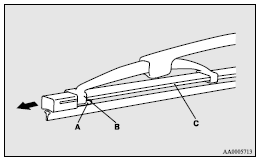
1. Lift the wiper arm off the windscreen.
2. Pull the wiper blade until its stopper (A) disengages from the hook (B). Then,
pull the wiper blade further to remove it.
 Note
Note
► Do not allow the wiper arm to fall onto the windscreen; it could damage the glass.
3. Attach the retainers (C) to a new wiper blade.
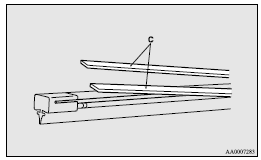
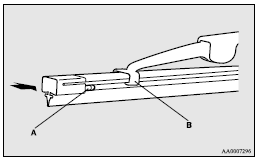
4. Insert the wiper blade into the arm, starting with the opposite end of the blade from the stopper. Make sure the hook (B) is fitted correctly in the grooves in the blade.
Note
► If retainers are not supplied with the new wiper blade, use the retainers from the old blade.
5. Push the wiper blade until the hook (B) engages securely with the stopper (A).
Rear window wiper blades
1. Lift the wiper arm off the window glass.
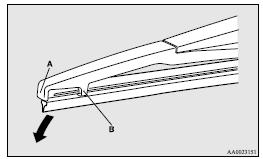
2. Pull the wiper blade downward to disengage it from the stopper (A) at the end
of the wiper arm. Pull the wiper blade further to remove it.
3. Slide a new wiper blade through the hook (B) on the wiper arm.
Note
► Do not allow the wiper arm to fall onto the window glass; it could damage the glass.
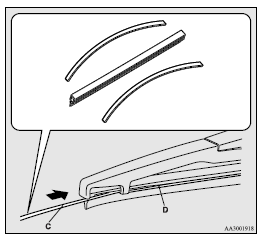
4. Firmly insert the retainer (C) into the groove (D) in the wiper blade.
Refer to the illustration to ensure that the retainers are correctly aligned as you insert them into the groove.
Note
► If a retainer is not supplied with the new wiper blade, use the retainer from the old blade.
See also:
Bonnet
To open
Pull the release lever towards you to unlock the bonnet.
Raise the bonnet while pressing the safety lock.
NOTE Only open the bonnet when the wipers are in the parked position. Failure
...
Checking battery electrolyte level
The electrolyte level must be between the specified limit on the outside of the
battery. Replenish with distilled water as necessary.
The inside of the battery is divided into several compartment ...
Change of the blower speed
Adjust the blower speed by turning the blower speed selection dial clockwise
or anticlockwise.
The blower speed will gradually increase as the dial is turned to the right.
Blower speed indicat ...