
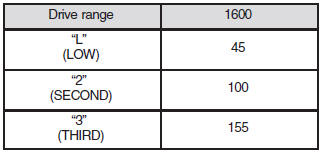
Possible driving speed (Except for vehicles with Sports mode)
In order to avoid damaging the engine due to excessively high rpm, do not exceed the possible driving speed when the selector lever is set to the “3” (THIRD) position, the “2” (SECOND) position or the “L” (LOW) position.
See also:
Twin Clutch SST control mode
Select the control mode from the following two types to suit the driving conditions.
Note
► When continuously driving on closed circuit tracks or at other locations where
the engine is op ...
Multi-link Rear Suspension
The Lancer's sophisticated new trailing-arm type multi-link rear suspension
is a major factor in providing ride and handling characteristics that might be
expected from a more expensive vehicle. T ...
To unlock
Press the UNLOCK switch (2). All the doors and the rear hatch will be unlocked.
If the front room lamp switch (if so equipped) is in the “DOOR” position and the
rear room lamp switch (except f ...