
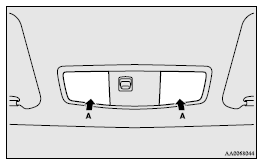
Map lamps
Push the lens (A) to turn on the lamp. Push it again to turn it off.
See also:
Air conditioning system refrigerant and lubricant recommendations
If the air conditioning seems less effective than usual, the cause might be a
refrigerant leak. Have the system inspected by your authorized MITSUBISHI dealer.
The air conditioning system in your v ...
Diesel particulate filter (DPF)
The diesel particulate filter (DPF) is a device that captures most of the particulate
matter (PM) in the exhaust emissions of the diesel engine. The DPF automatically
burns away trapped PM during ...
To listen to tracks from a device connected via Bluetooth
1. Press the PWR button (2) to turn on the audio system. The system turns on
in the last mode used.
2. Press the CD button (1) several times to switch to the B (Bluetooth®) mode.
The input mode ...