
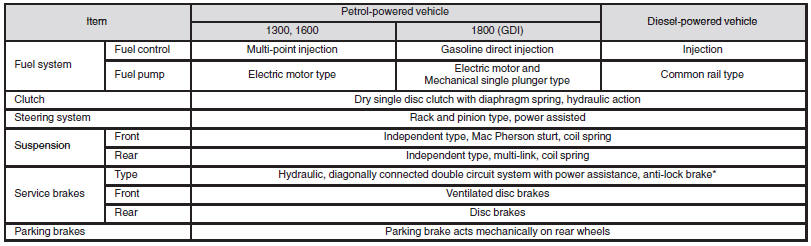
Other specifications
See also:
Sunshade
Slide the sunshade manually to open and close it.
Caution
► Be careful that hands are not trapped when closing the sunshade.
Note
► Be sure to tilt down the sunroof before closing ...
The Look
The current-generation Lancer sedan has been sold since early 2007. (See a
side-by-side comparison of the 2010 Lancer Sportback and sedan.) Mitsubishi has
resurrected the Sportback name for 2010, ...
When turning from “ACC” to “LOCK”
[Vehicles equipped with M/T] Put the gearshift lever into the “N” (Neutral) position,
and slowly turn the ignition switch to the “LOCK” position while pressing it.
[Vehicles equipped with C ...