
Parking brake
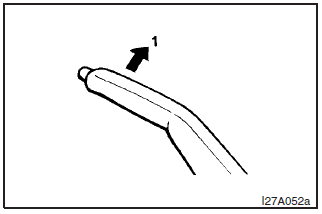
To park the vehicle, first bring it to a complete stop, fully engage the parking brake and then move the gear shift lever to 1st (on an uphill) or Reverse (on a downhill) position, for vehicles with a manual transmission or set the selector lever to “P” (PARK) position on automatic transmission vehicles.
To apply
1- Pull the lever up without pushing the button at the end of the hand grip.
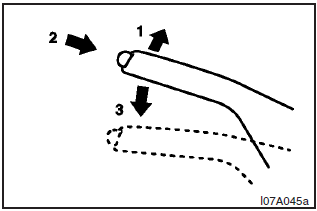
To release
1- Pull the lever up slightly.
2- Push the button at the end of the hand grip.
3- Push the lever downward.
NOTE
To prevent the parking brake from being released unintentionally, the lever must be pulled upward slightly before it can be pushed downward. Simply pressing the button does not enable the lever to be pushed downward.
When parking on a hill, apply the parking brake and turn the front wheels towards the kerb on a downhill grade, away from the kerb on an uphill grade.
CAUTION
Before driving, be sure that the parking brake is fully released and the brake warning lamp is off.
If a vehicle is driven without releasing the parking brake, the brake will be overheated, resulting in ineffective braking and possible brake failure.
See also:
Folding the seat (Hatchback)
1. Remove the rear shelf panel and rear head restraints. Refer to the description
of “Rear shelf panel” on page NO TAG and “Head restraints” on page 3–7.
2. Pull the band (between the ...
Error codes
If an error code appears in the display, take action in accordance with the table
below.
...
Ride Quality & Noise
When you're not having fun tossing this car around, you're really not having
fun. The ride is harsher than an all-wheel-drive Lancer we tested without the
sports suspension; rough roads jostle the ...