
Cooling
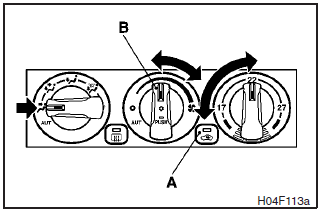
Set the mode selection dial to the “ ”
position.
”
position.
Set the air selection switch (A) to the outside position and push the air conditioning switch (B).
Adjust the temperature by turning the temperature control dial clockwise or anticlockwise. Select the desired blower speed.
NOTE
If the outside air is dusty or otherwise contaminated, or if high cooling performance is desired, set air selection switch to the recirculation position and the temperature control dial all the way to the left.
Switch to the outside position periodically to increase ventilation so that the windows do not become fogged up.
CAUTION
When using the air conditioning, the idling speed may slightly increase as the air conditioning compressor is switched on/off automatically. Especially for vehicles with an automatic transmission, while the vehicle is stationary, fully depress the brake pedal to prevent the vehicle from creeping.
See also:
Outside temperature display screen
This shows the temperature outside the vehicle.
Note
► The display setting can be changed to the preferred units (°C or °F).
Refer to “Changing the function settings (when the ignition ...
To listen to a CD
1. Insert disc with label facing up.
When a disc is inserted, the CD indicator (16) will come on and the CD player
will begin playing even if the radio is being used.
The CD player will also start ...
During a long period of disuse
The air conditioning should be operated for at least five minutes each week,
even in cold weather. This is to prevent poor lubrication of the compressor internal
parts, and to maintain the air con ...