
Glove box
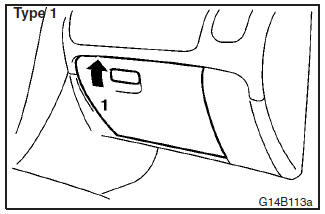
Type 1
1- To open, pull the lever.
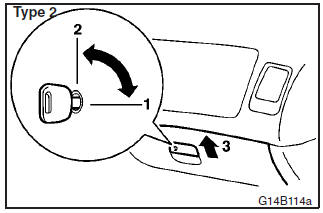
Type 2
1- To lock
2- To unlock
3- To open, pull the lever.
NOTE
If the box is opened when the headlamps turn on, the glove box lamp illuminates.
See also:
Rigidity Throughout
The lower body structure, where the suspension attaches to the car, also
demonstrates the benefits of higher rigidity than before. Here, one can
appreciate the holistic approach engineers used to ...
Keyless operation system
The keyless operation system allows you to lock and unlock the doors and tailgate,
start the engine and change the operation mode simply by carrying the keyless operation
key with you.
The keyles ...
Information screen display
Brake warning display
This warning is displayed if you drive with the parking brake still applied.
The warning lamp in the instrument cluster only illuminates when the parking brake
is applied. ...