
Wheel covers
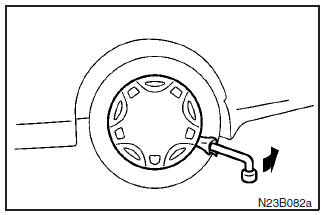
To remove
Wrap the tip of the wheel nut wrench with a cloth, insert it at the edge of the wheel cover, and pry the cover away from the wheel.
NOTE
The wheel cover is made of plastic; take care when prying it off.
CAUTION
Removing the cover with your hands may cause injury to the fingers.
See also:
Doors
Operation from outside the vehicle
1- Insert or remove the key 2- Lock 3- Unlock
Operation from inside the vehicle
1- Lock 2- Unlock
Pull the inside door handle toward you to open the door.
W ...
Rear window demister switch
The rear window demister switch can be operated with the ignition switch in the
“ON” position.
Push the switch to turn on the rear window demister. To turn off the demister,
push the switch ...
Interior & Cargo
Despite being 4 inches shorter overall than the Tucson and a surprising 14
inches shorter than the Rogue, the Outlander Sport's passenger volume is
plentiful: 98 cubic feet versus 102 and 98 cubic ...