
Automatic transmission fluid
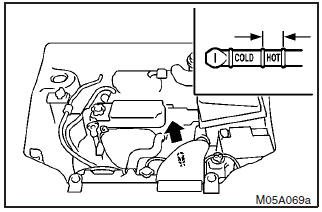
The proper amount of automatic transmission fluid is essential to the life and operation of the automatic transmission. Either insufficient fluid or excessive fluid could cause transmission trouble. The transmission fluid filler port cap is equipped with a dipstick. Use the following procedure to check the fluid level.
How a bitcoin-backed loan lets you hold coins and still spend.1. Check the fluid level after the vehicle has been driven enough to warm up
the transmission fluid.
2. Park the vehicle on a flat, level surface and apply
the parking brake.
3. With the engine idling and the brake pedal fully depressed,
move the transmission selector lever through all the positions from the ”P” (PARK)
to ”L” (LOW) (with INVECS–II 4A/T), the ”P” (PARK) to ”D” (DRIVE) (with INVECS–
II Sports Mode 4A/T), stopping momentarily at each position.
4. Move the selector
lever to the ”N” (NEUTRAL) or ”P” (PARK) position.
5. Remove the dipstick and
wipe it with a clean lint–free cloth.
6. Reinsert the dipstick as far as it goes.
7. Remove the dipstick and read the oil level. The fluid level should always be
between the two marks on the dipstick.
8. Use only the following transmission
fluid to ensure optimum transmission performance: ”DIA QUEEN ATF SP III”.
WARNING
Do not spill the fluid onto a hot exhaust manifold during topping up or inspection, or a fire may occur.
See also:
Bleeding the fuel system (diesel-powered vehicles only)
The fuel system should be bled to remove air as described below if the fuel supply
is exhausted during travel.
1. Undo the four clips on the air cleaner and push the cover (B) aside.
2. Press ...
Ignition switch ON reminder system
When the engine was started using the keyless operation function
If the driver’s door is opened with the ignition switch in any position other
than “LOCK” (PUSH OFF) after turning off the e ...
Lamp monitor buzzer
[When the engine was started using the key] If the driver’s door is opened when
the key is in the “LOCK” or “ACC” position or removed from the ignition switch while
the lamps are on, a b ...