
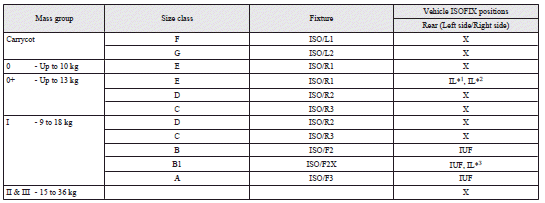
Suitability for various ISOFIX positions
 Caution
► When installing a child restraint system, prevent the head restraint from touching the child restraint system by removing it or adjusting its height.
Key of letters to be inserted in the table above:
► IUF- Suitable for ISOFIX forward child restraint systems of universal category
approved for use in the mass group.
► IL- Suitable for particular ISOFIX child restraint systems given in the following
list (MITSUBISHI MOTORS genuine parts).
► X- ISOFIX position not suitable for ISOFIX child restraint systems in this mass
group and/or this size class.
IL (Genuine part information)

#1: To be available in 2012
 Note
Note
► MITSUBISHI MOTORS Europe B.V. reserves the right to changes without any prior announcement.
For further information, please contact a MITSUBISHI MOTORS Authorized Service Point.
Suitability for various seating positions
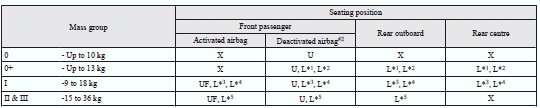
#2: With front passenger’s airbag deactivated by means of front passenger’s airbag ON-OFF switch.
Caution
► When installing a child restraint system, prevent the head restraint from touching the child restraint system by removing it or adjusting its height.
Key of letters to be inserted in the table above:
► U- Suitable for “universal” category restraints approved for use in this mass
group.
► UF- Suitable for forward-facing “universal” category restraints approved for use
in this mass group.
► L- Suitable for particular child restraints in the following list (MITSUBISHI
MOTORS genuine parts).
► X- Seat position not suitable for children in this mass group.
L (Genuine part information)

#3: To be available in 2012
Note
► There is no applicable MITSUBISHI MOTORS Genuine Parts to the Mass Group “0-Up to 10 kg”.
MITSUBISHI MOTORS Europe B.V. reserves the right to changes without any prior announcement.
For further information, please contact a MITSUBISHI MOTORS Authorized Service Point.
See also:
Economical driving
For economical driving, there are some technical requirements that have to be
met. The prerequisite for low fuel consumption is a properly adjusted engine. In
order to achieve longer life of the v ...
Used engine oils safety instructions and disposal information
Warning
► Prolonged and repeated contact may cause serious skin disorders, including
dermatitis and cancer.
► Avoid contact with the skin as far as possible and wash thoroughly after ...
Manual reset mode
► When the average fuel consumption is being displayed, if you hold down the
multi-information meter switch, the average fuel consumption displayed at that time
is reset. ...