
Control panel
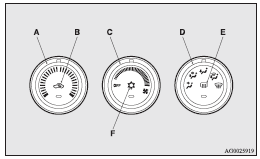
A- Temperature control dial
B- Air selection switch
C- Blower speed selection dial
D- Mode selection dial
E- Rear window demister switch
 Note
Note
► Button (F) is not available for use. The indicator below the button doesn’t come on even if it is pushed.
See also:
Speaker enrollment function
The Bluetooth® 2.0 interface can use the speaker enrollment function to create
a voice model for one person per language.
This makes it easier for the Bluetooth® 2.0 interface to recognise voice ...
To recline the seatback
Manual type
In order to recline the seatback, lean forward slightly, pull the seatback lock
lever up, and then lean backward to the desired position and release the lever.
The seatback will lock i ...
Subaru Plans to Introduce 3 New EVs by 2026
Subaru has announced its intention to expand its electric vehicle (EV) lineup with three new all-electric SUVs by 2026. This initiative is part of Subaru's broader goal to sell 200,000 EVs globally ...