
Warning activation
In order to prevent vehicle theft or the accidental operation of the keyless operation system, the buzzer and the display on the information screen in the multi- information display are used to alert the driver.
If a warning is activated, always check the vehicle and the keyless operation key. The warning is also displayed if there is a fault in the keyless operation system.
If any of the following warnings are activated, please contact a MITSUBISHI MOTORS Authorized Service Point.
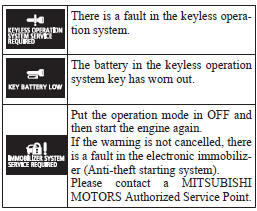
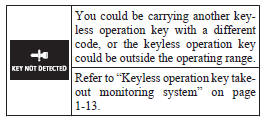
In the following cases, a warning is activated, but it can be cancelled if the correct actions are followed.
• The ID codes for the keyless operation key and vehicle do not match.
• Even though you press the driver’s or front passenger’s door lock/unlock switch, or the tailgate LOCK switch, the doors and tailgate are not locked.
Keyless operation key take-out monitoring system
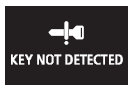
When the vehicle is parked with the operation mode in any mode other than OFF, if you close the door after opening any of the doors and taking the keyless operation key out of the vehicle, a warning displays and the buzzer sounds 4 times.
 NOTE
NOTE
• If you take the keyless operation key out of the vehicle through a window without opening a door, the keyless operation key takeout monitoring system does not operate.
• It is possible to change the setting to make the keyless operation key take-out monitoring system operate if you take the keyless operation key out from the vehicle through a window without opening a door. For further information, please contact your MITSUBISHI MOTORS Authorized Service Point.
• Even if you have the keyless operation key within the engine start operating range, if the keyless operation key and vehicle ID codes cannot be matched, for example due to the ambient environment or electromagnetic conditions, the warning may be activated.
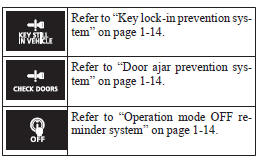
Key lock-in prevention system

When the operation mode is in OFF, if you close all the doors and the tailgate with the keyless operation key left in the vehicle and you try to lock the doors and tailgate by pressing the driver’s or front passenger’s door lock/unlock switch, or the tailgate LOCK switch, a warning is issued with the warning display and the buzzer buzzing for approximately 3 seconds and you cannot lock the doors and tailgate.
NOTE
• Make sure you have the keyless operation key with you before locking the doors. Even if you leave the keyless operation key inside the vehicle, it is possible that the doors will lock depending on the surrounding environment and wireless signal conditions.
Door ajar prevention system

When the operation mode is in OFF, if you try to lock the doors and tailgate by pressing the driver’s or front passenger’s door lock/unlock switch, or the tailgate LOCK switch with one of the doors or the tailgate not completely closed, a warning is issued with the warning display and the buzzer buzzing for approximately 3 seconds and you cannot lock the doors and tailgate.
Operation mode OFF reminder system

When the operation mode is in any mode other than OFF, if you close all the doors and the tailgate then try to lock the doors and tailgate by pressing the driver’s or front passenger’s door lock/unlock switch, or the tailgate LOCK switch, a warning is issued with the warning display and the buzzer buzzing for approximately 3 seconds and you cannot lock the doors and tailgate.
See also:
To lock
Press the LOCK switch (1). All the doors and rear hatch will be locked. The turn-signal
lamps will blink once.
Note
► With a vehicle that has a Dead Lock System, pressing the LOCK switch (1 ...
Electronically controlled 4WDsystem
The electronically controlled 4WD system is a 4- wheel drive system that allows
one of three drive modes to be selected with a dial, in accordance with the driving
conditions.
The following drive ...
To listen to the radio
1. Press the PWR switch or the AM/FM button to turn ON the radio.
Press the PWR switch again to turn OFF the radio.
2. Press the AM/FM button to select the desired band.
3. Turn the TUNE switch, or ...