
Driver’s seat belt warning lamp and display
Warning lamp

A tone and warning lamp are used to remind the driver to fasten the seat belt.
If the ignition switch is turned to the “ON” position or the operation mode is put in ON while a seat belt is not fastened, the warning lamp illuminates and the tone sounds for about 6 seconds to remind the driver to fasten the seat belt.
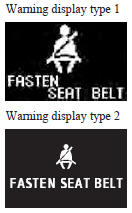
If the vehicle is driven without fastening the seat belt, approximately 1 minute after the ignition switch is turned to the “ON” position, the warning lamp illuminates and flashes repeatedly, and the tone sounds continuously. In addition, the warning display will be displayed on the information screen in the multi-information display.
The warning lamp goes off and the tone stops after approximately 90 seconds.
Subsequently, if the seat belt is still not fastened, the warning lamp and tone will be activated to remind the driver to fasten the seat belt whenever the vehicle is stopped and started again. The warning will operate in the same way if the seat belt is removed while driving the vehicle. The warning will stop when the seat belt is fastened.
See also:
Starting the engine (Petrol-powered vehicles)
This vehicle is equipped with an electronically controlled fuel injection system
which is automatically controlled. When starting the engine, do not depress the
accelerator pedal. ...
Precautions to observe when using wipers and washers
(1) If the moving wipers become blocked by ice or other deposits on the glass,
the motor may burn out even if the wiper switch is turned to OFF. If obstruction
occurs, park your vehicle in a safe ...
Force limiter system
In the event of a collision, each force limiter system will effectively absorb
the load applied to the seat belt to minimize the impact to the passenger. ...