
Momentary fuel consumption display
While driving, this displays the momentary fuel consumption, using a bar graph.
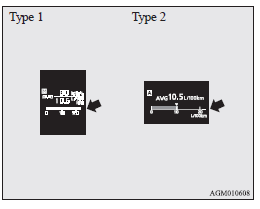
When the momentary fuel consumption surpasses the average fuel consumption, the momentary fuel consumption is displayed with a green bar graph.
(Type 2) Be conscious that when maintaining the momentary fuel consumption above the average fuel consumption, driving with better fuel consumption can be possible.
 NOTE
NOTE
• When the momentary fuel consumption cannot be measured, the bar graph is not displayed.
• The display setting can be changed to the preferred units {km/L, mpg (US), mpg (UK) or L/100 km}. Refer to “Changing the function settings (when the ignition switch or the operation mode is ON)”.
• It is possible to cancel the green bar graph.
Refer to “Changing the function settings (when the ignition switch or the operation mode is ON)”.
See also:
Clutch pedal free play
Press down the clutch pedal with your fingers until initial resistance is felt.
This distance should be within the specified range.
A- Free play: 6 to 13 mm
If the clutch pedal free play is not ...
Useful voice commands
Help function
The Bluetooth® 2.0 interface is equipped with a help function.
If you say “Help” when the system is waiting for a voice command input, the system
will tell you a list of the com ...
Plug-in Hybrid Mercedes-Benz C 300 e
Mercedes-Benz has conducted a comprehensive lifecycle assessment of its latest innovation, the C-Class C 300 e plug-in hybrid sedan. This evaluation considers both production and charging processes ...